Free On Android · no ads, no data selling

See your health clearly.

Log glucose, blood pressure and more in seconds. Snap a photo of your meter, get a reminder at the right moment, and see your patterns within 1–2 weeks.

6 health metrics Works offline Bring your own AI
Blood glucose mg/dL · mmol/L Blood pressure mmHg Heart rate bpm Weight kg · lb Blood oxygen SpO₂ % Temperature °C · °F
How it works

Four steps to a clearer picture

The same four ideas you meet when you open the app: track, snap, remind, and see your patterns.

01 · Track

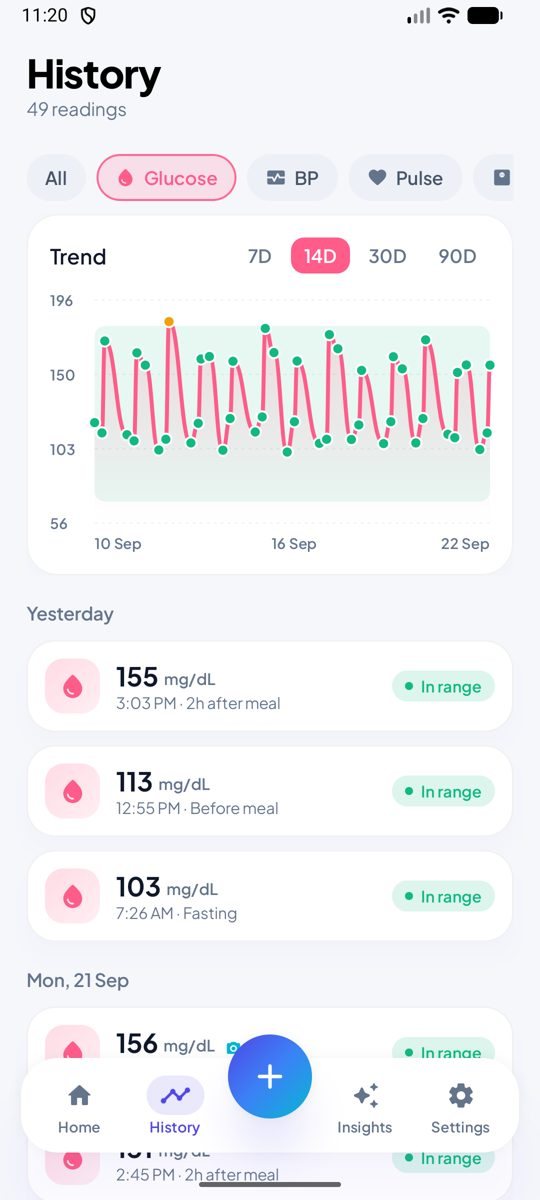
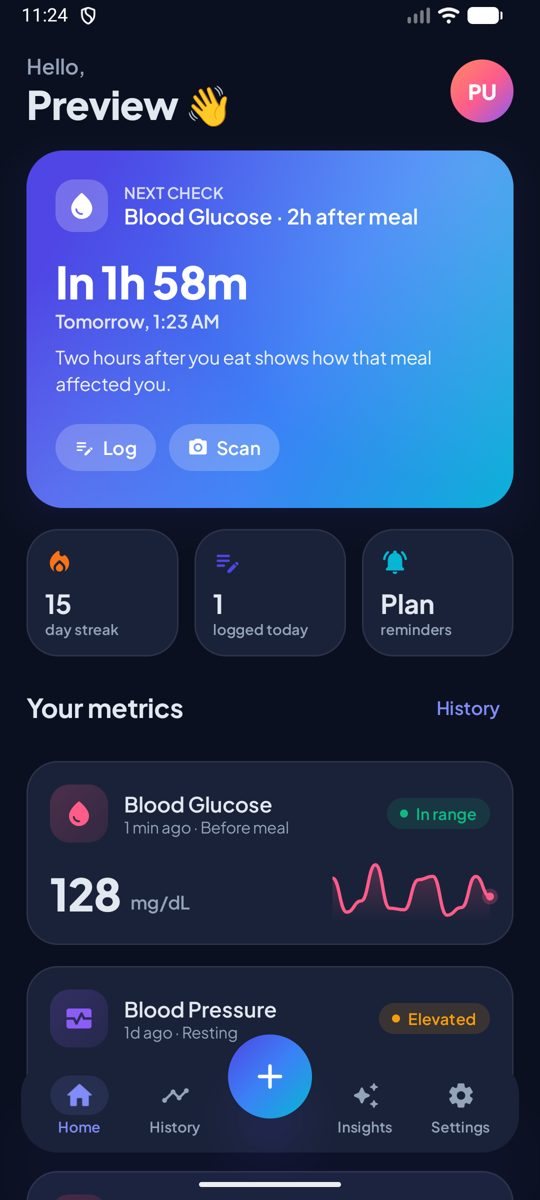
Every reading, one calm place

Glucose, blood pressure, heart rate, weight, oxygen and temperature. Built for diabetes care, and for anyone keeping an eye on their health.

  • Tag each reading: fasting, before a meal, 2 h after, bedtime
  • Switch units: mg/dL ↔ mmol/L, kg ↔ lb, °C ↔ °F
  • Works offline, then syncs to your private account
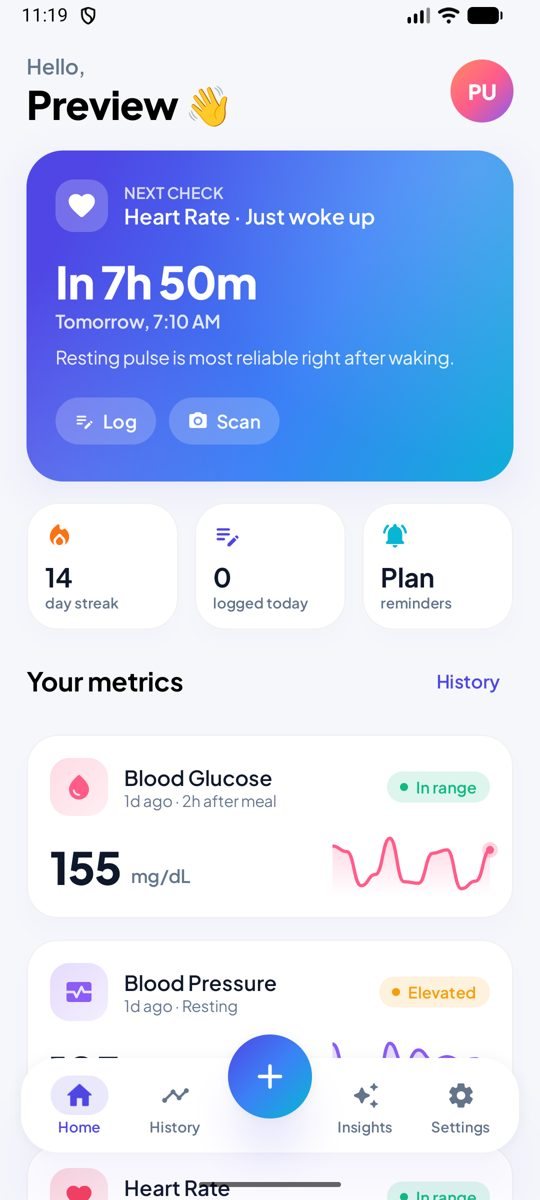
HealthLens home screen showing the next check and your metrics
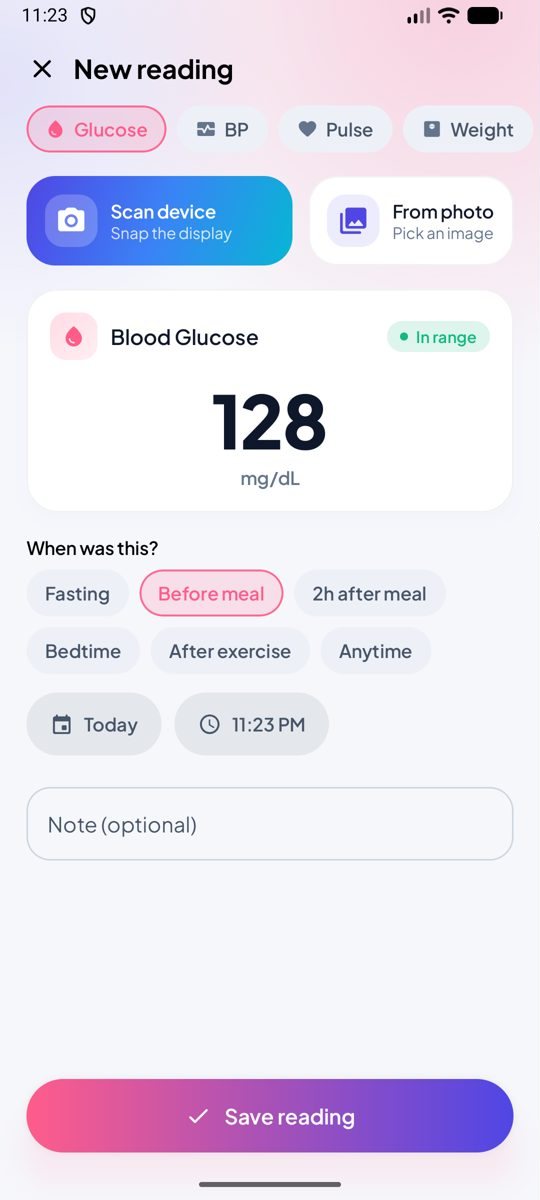
02 · Snap

Snap it, don't type it

Point your camera at your meter or monitor. HealthLens reads the display and fills in the numbers for you.

  • Text recognition runs on your phone
  • Optional fallback: your own AI model reads difficult displays
  • Scan photos are deleted from the phone within 24 hours
New reading screen with Scan device and From photo buttons
03 · Remind

Nudges at the right moment

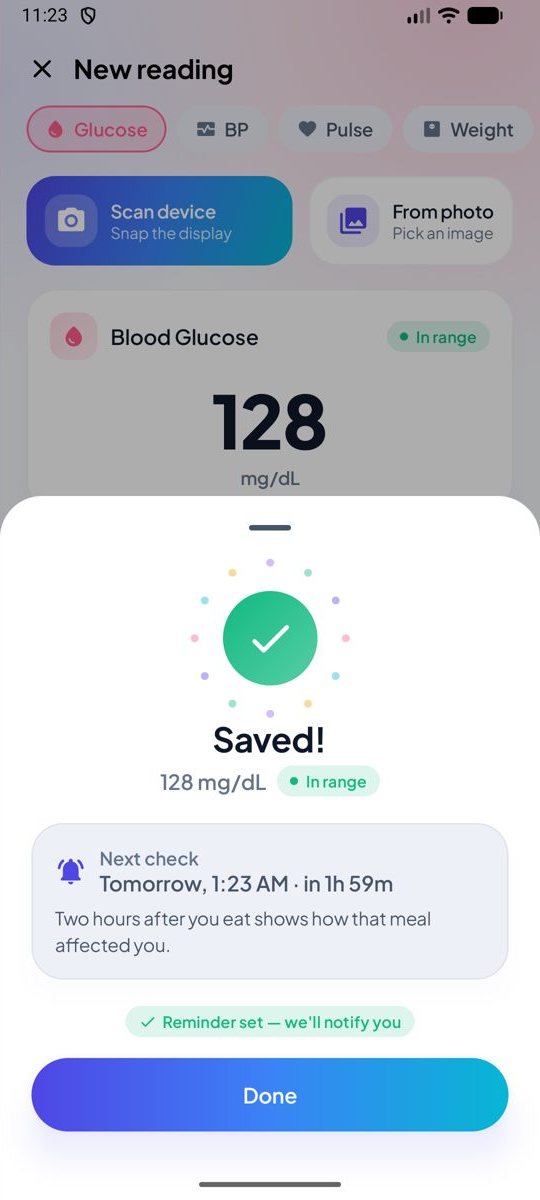
After each reading HealthLens suggests your next check, like two hours after a meal, and reminds you right on time.

  • Learns your routine and stays within your waking hours
  • Suggests a quick re-check when a reading looks too low or too high
  • Log, scan or snooze straight from the notification
Saved reading with the next check suggested two hours after a meal
04 · Insights

See your patterns in 1–2 weeks

Find out when your numbers run high, where they're heading, and get a coaching summary from the AI model you choose.

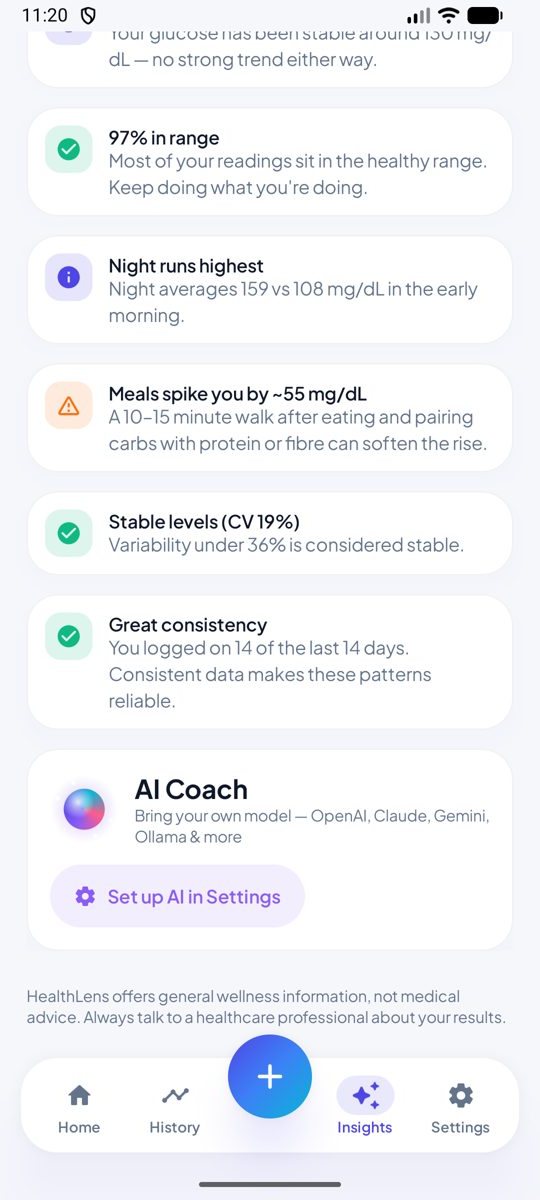
  • Time-of-day averages, time in range and meal spikes
  • "If this pattern continues" projections for each time of day
  • Export a CSV for your doctor
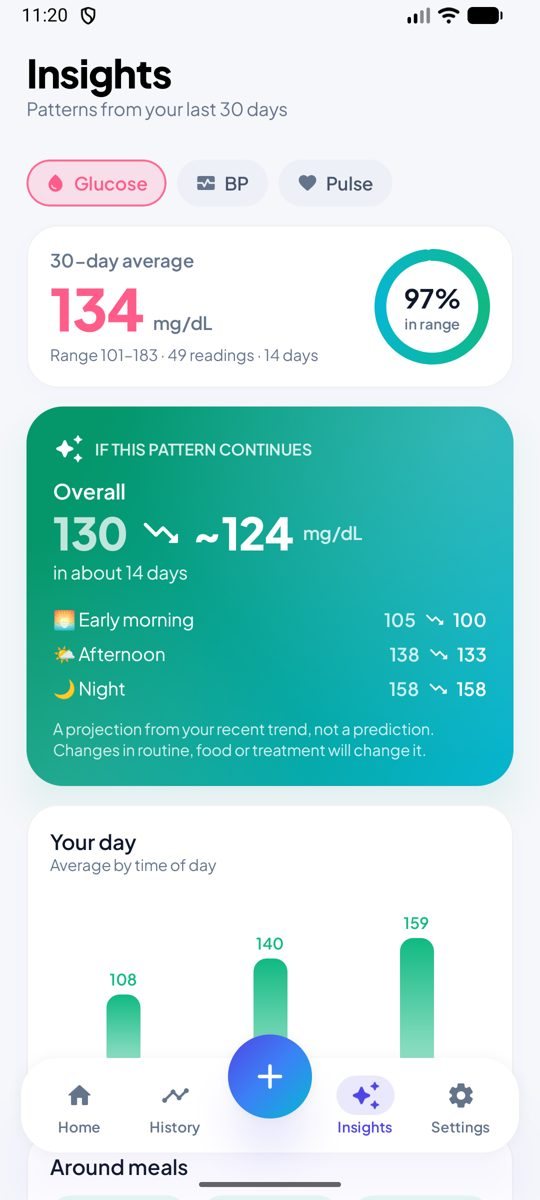
Insights screen with a 30-day average and a projection card
Try it

Log a reading, see what happens next

Pick a metric and move the slider. This demo uses the same ranges and next-check rules as the app. Nothing you enter here leaves this page.

Metric
Blood glucose In range
128
mg/dL
Diastolic
When was this?
I'm managing diabetes (uses diabetes targets)
Next check
In 2 h

Two hours after you eat shows how that meal affected you.

Where this reading sits
LowIn rangeAboveHigh

Target before a meal: 80–130 mg/dL.

Good to know

Logging a short note ("pasta dinner", "poor sleep") makes AI insights much sharper.

General reference ranges for adults, shown as guidance only. HealthLens offers general wellness information, not medical advice.

Insights

Patterns that answer real questions

"When am I highest?" "Is it improving?" After a week of logging, every chart answers something. The statistics run on your phone, for free, with no AI needed.

If this pattern continues
Overall
130~124mg/dL
in about 14 days

A projection from your recent trend, not a prediction. Changes in routine, food or treatment will change it.

Your day

Average by time of day · mg/dL

97% in range
0of 7 days

Patterns unlock after 7 days

Log on 7 days (or 10 readings) and HealthLens maps your patterns. A progress ring on Home shows how close you are.

AI coach

Your model. Your key.

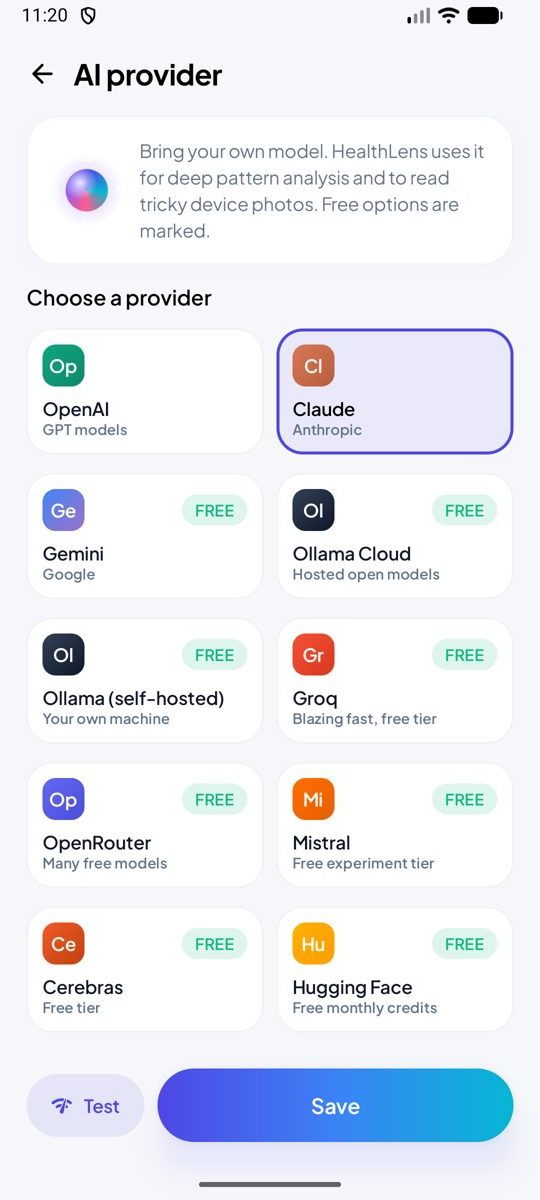
Get a friendly, plain-language summary of your data with practical ideas for this week. Connect the AI you prefer. Many providers have free tiers.

Your API key is encrypted with the Android Keystore and never leaves your phone.
Works with OpenAI, Claude, Gemini, Ollama (cloud or your own computer), Groq, OpenRouter, Mistral, Cerebras, Hugging Face, DeepSeek, xAI, or any OpenAI-compatible server.
Optional. Readings go to your provider only when you tap Analyse.

Summary

Your glucose averaged 134 mg/dL over the last 14 days, and 97% of readings were in range. Mornings are steady; evenings run higher.

Patterns I noticed

  • Night averages 159 mg/dL vs 108 in the early morning.
  • Meals raise you by about 55 mg/dL two hours later.

Try this week

  • A 10–15 minute walk after dinner.
  • Pair evening carbs with protein or fibre.
Built for everyone

Designed first for diabetes. Useful for everyone.

Blood-pressure tracking, heart health, weight journeys, caring for a parent, or just keeping an eye on things.

Living with diabetes

Fasting and after-meal checks

Meal-aware reminders, before-and-after-meal comparisons and 2-week projections show whether diet changes are working.

Meal spikesTime in range

Watching blood pressure

Morning and evening log

Routine reminders, morning-surge detection and a CSV export you can hand to your doctor.

Morning surgeCSV export

Fitness & weight

Daily weigh-in, resting pulse

Weight trend in kg per week, resting heart rate after waking, and a streak that keeps you going.

kg / weekStreaks

Caring for someone

A parent's readings

Snap their meter instead of typing. HealthLens reads the display and files it with the right context.

Photo scanSpO₂ & temp
Private by design

Your readings are yours alone

We never sell your data or show ads, and we don't use your readings to train AI models.

Sign in with GoogleNo passwords to remember. We only ask for your name and email.
Only you can see themRow-level security means each account can read only its own rows.
AI keys stay on your phoneEncrypted with the Android Keystore, never sent to our servers.
Photos read on your phoneNever uploaded to our servers. Cleared from the phone within 24 hours.
No ads, no trackersNo advertising ID, no location, no contacts, and no data from other apps.
Export or delete anytimeExport a CSV for your doctor. Delete your account in Settings, instantly.
Inside the app

Calm, clear, made to be used daily

Light and dark themes, animated illustrations, and big numbers you can read at a glance.

FAQ

Questions, answered

Is HealthLens free?
Yes. HealthLens is free, with no ads and no in-app purchases. The optional AI coach uses your own key with the provider you choose, and some providers charge for usage under their own pricing. Many, like Gemini, Groq and Ollama, have free tiers.
Is HealthLens a medical device?
No. HealthLens offers general wellness information. It doesn't diagnose or treat any condition, and it never tells you to change medication. Always talk to a healthcare professional about your results, and seek emergency care if you feel unwell.
Do I need an AI key to use it?
No. Logging, reminders, charts and pattern analysis all work without AI, offline and for free. AI adds a written coaching summary on top, and can help read difficult device photos.
Which devices can it read from a photo?
HealthLens looks for the big numbers on a device's display, such as a glucometer, blood-pressure cuff, pulse oximeter, thermometer or scale. The text recognition runs on your phone. If a display is hard to read, you can type the value or ask your AI provider to read it.
Where is my data stored?
Your readings are kept on your phone and synced to your private account on Supabase, hosted in the Mumbai (ap-south-1) region. Row-level security means only your account can read your rows. See the privacy policy for details.
Does it work offline?
Yes. HealthLens is local-first: everything saves instantly on your phone and syncs when you're back online.
Which phones does it support? Is there an iPhone app?
HealthLens runs on Android 8.0 and newer. It's Android-only for now.
How do I delete my account?
In the app, go to Settings → Delete account. Your account and all its data are deleted right away. If you can't use the app, follow the steps on the account deletion page.

Start seeing your health clearly.

Two taps and a number, or one photo. Your patterns show up in 1–2 weeks.